
Create and edit ideas
Title, status (Insight, Concept, Prototype), a note for the team and a private note that stays on the device.
FFE-Connect (Fuzzy-Front-End-Connect) connects the early ideation phase of product development: a native app for the creative start of collection development. Product managers capture ideas as an image with notes and place them in the collection matrix via drag & drop. Built by enpit for a shoe manufacturer.
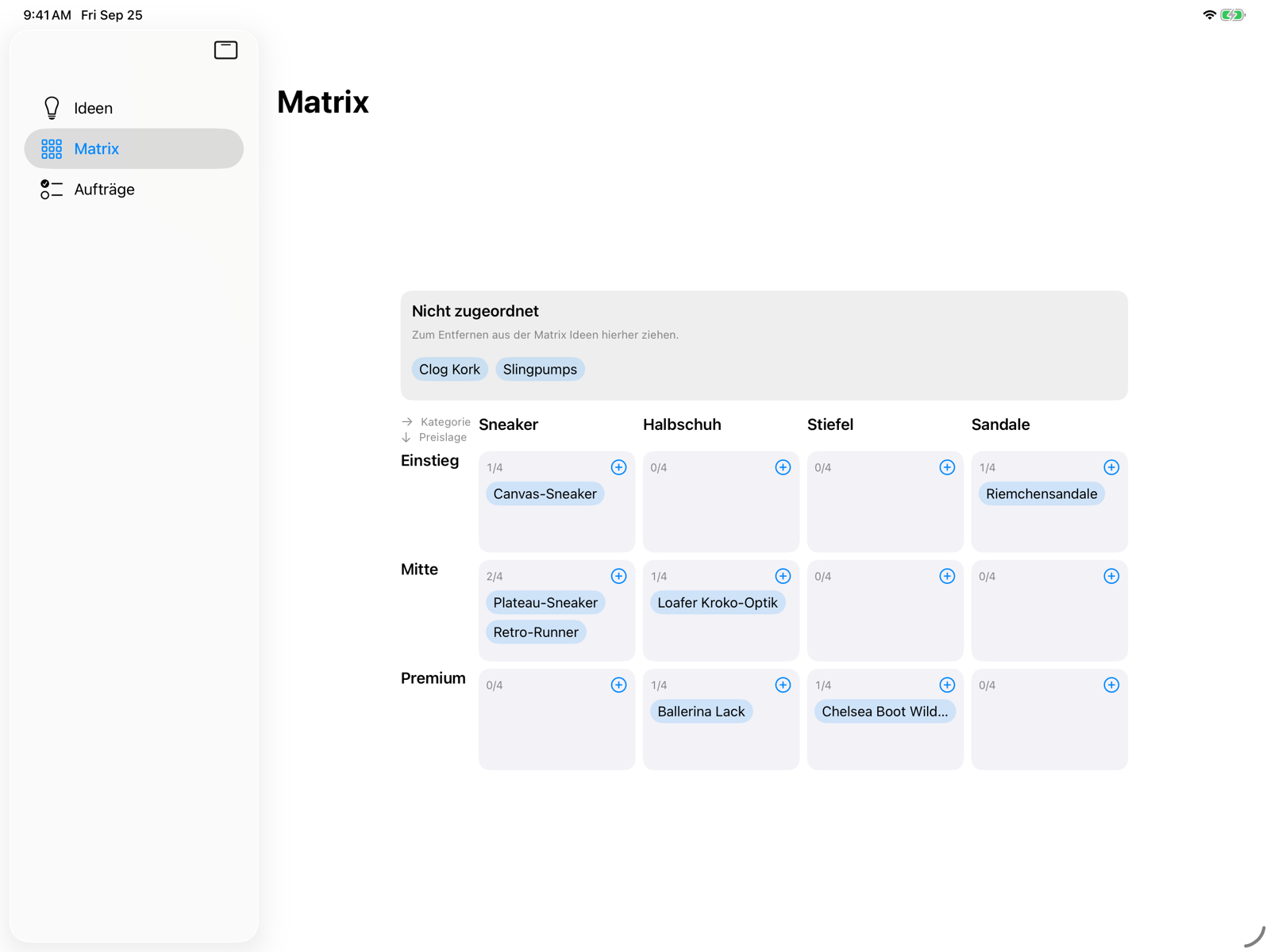
iPad: screenshot of the app (matrix view in the iPad simulator, with sample ideas). iPhone: illustration (mockup), not a screenshot of the “New Idea” view.
FFE-Connect is a native SwiftUI app for iPad (primary device) and iPhone with its own backend. The app is a tool for communication and coordination, not a design tool. It covers pre-production, i.e. the time before prototypes are built.
A shoe manufacturer with several brands develops its collections with teams in Europe and Asia working together.
The PLM manages product data but barely covers the creative start of a collection. Quick ideas, images, comments and alignment across language barriers therefore happen outside the system.
Creatives capture ideas without filling in forms. Behind the scenes, structured data is still created that later feeds into briefs for specialist teams and the handover to the PLM.
Title, status (Insight, Concept, Prototype), a note for the team and a private note that stays on the device.
Camera, photo library, files and “Open in …” from other apps, such as an image from an email or a photographed sketch.
Numbered freehand markups with finger or Apple Pencil, each with text, a voice note and a focus area.
Sole, material, upper, whole shoe or price range per idea and markup. One shared filter with search applies to the idea list and the matrix.
Freely selectable axes (at least category × price range), target quantity and actual count per cell. Place ideas via drag & drop or by tapping; the placement sets their attributes.
Take over products from the previous season into the matrix by product ID from the master data, linked rather than copied.
Ideas are synced with the backend, the private note stays local. The interface is available in German, English, Chinese (Simplified) and Italian.
Signed builds from the pipeline, distributed via Apple’s TestFlight. Technical foundation: modular Swift 6 app, Node.js/TypeScript, PostgreSQL, S3, OpenAPI, CI with tests on every push.
Translate notes and markups (the original remains authoritative) and transcribe voice notes, right on the device. The services are in place; integration into the interface follows.
Create briefs for last, coloring, material or design teams from an idea. Task view, status with a revision loop, feedback and sign-off.
Read-only connection of lasts, soles and materials from the source systems. Structured export as a first step towards the PLM handover.
Sign-in via SSO, roles and permissions, privacy by design and distribution via MDM for the full rollout.
AI outlook: A classification suggestion (product family, main category, product group, bottom type) is planned but deliberately on hold for now. The interfaces for it are already in place. No content leaves the device without approval.
In a remote session, the client’s business team explained the desired workflow and showed screenshots of an existing click prototype. Requirements and backlog were derived from that, without detours through lengthy specification documents.
The meeting notes were drafted with AI assistance and then checked for accuracy. They were complemented by six screenshots of the click prototype.
MVP scope prioritized with MoSCoW, including non-functional requirements (data sovereignty, GDPR, works council co-determination) and open issues. Roles instead of names.
7 epics and 30 stories with acceptance criteria as GitHub issues, spread across increments and short iterations.
A first demo version of FFE-Connect is available via Apple’s TestFlight. Enter the email address of your Apple ID and we will invite you to the demo.
Submitting opens your email app with a prepared message to info@enpit.de. This page does not store or transmit anything. We only use your address for the TestFlight invitation.
This is how we jointly expand FFE-Connect into a production-ready solution: as a service with fixed team capacity and a budget derived from the value you define. AI agents handle large parts of the implementation, while enpit engineers and the business team steer and review every step.
A mixed team of strategy, UX and engineering under a service contract, billed as a flat fee per sprint.
The budget is derived from the value the solution has for you, with a minimum budget. This determines the number of sprints.
Repository, CI/CD, AI assistance and guardrails run in your tenant from day one. The usage rights are yours, not enpit’s.
Sprint reviews with value tracking. You can end the collaboration at the end of any sprint.
Jointly determine the value of the solution. Result: value record, budget frame and stage plan.
Gate G0Set up repository, pipeline, AI assistance and guardrails in your environment.
Gate G1A joint technical spike: one external system (e.g. ERP, CRM) through all layers into the app. The result is a working alpha version with one fully integrated use case, so technical risks become visible before the main development starts.
Gate G2Short sprints with reviews and value tracking. The business team signs off on each story, and interim versions reach test devices early.
Gate G3Hardening, testing and pilot feedback on the way to version 1.0.
Gate G4Source code, documentation and the agentic development process are handed over to your IT team, accompanied by a hypercare phase.
Gate G5Your choice: phase out into in-house operation, or monthly maintenance and operation at the Basic, Plus or Plus + Development level.
At every gate you decide: go, adjust course or stop. We do not promise that every use case goes into production, since budget and approvals are yours. We promise not to build anything unless we know how it will go into production.
The workshop fee is credited when you commission the project.